
Sending Tasks
You can create and modify tasks in your LaunchBay projects without clients seeing them until you are ready; both Portal Tasks and Private Tasks are automatically set to the "Draft" status and not visible to clients in their portals until you send them.
This article will explain the different options available for sending tasks in LaunchBay.
Want clients to preview upcoming work before it starts?
Turn on "Show draft tasks in client portal" in your project settings. Draft portal tasks will then appear in the portal with a Draft tag, but clients can't open or complete them until you send them.
Want clients to preview upcoming work before it starts? Turn on "Show draft tasks in client portal" in your project settings. Draft portal tasks will then appear in the portal with a Draft tag, but clients can't open or complete them until you send them.
How to Send Tasks
To send a task, you must first assign them. Clients can not access "Draft" tasks in their portals and will not receive notifications or reminder emails about them until you or a team member officially sends them.
Tip: You can assign tasks one at a time using the task composer or use LaunchBay's bulk actions dropdown to set assignees for multiple tasks simultaneously.
1. Send Tasks Using the Task Composer
To send a task from the task composer, click the dropdown arrow next to the "Save Task" button and select "Save and Send."

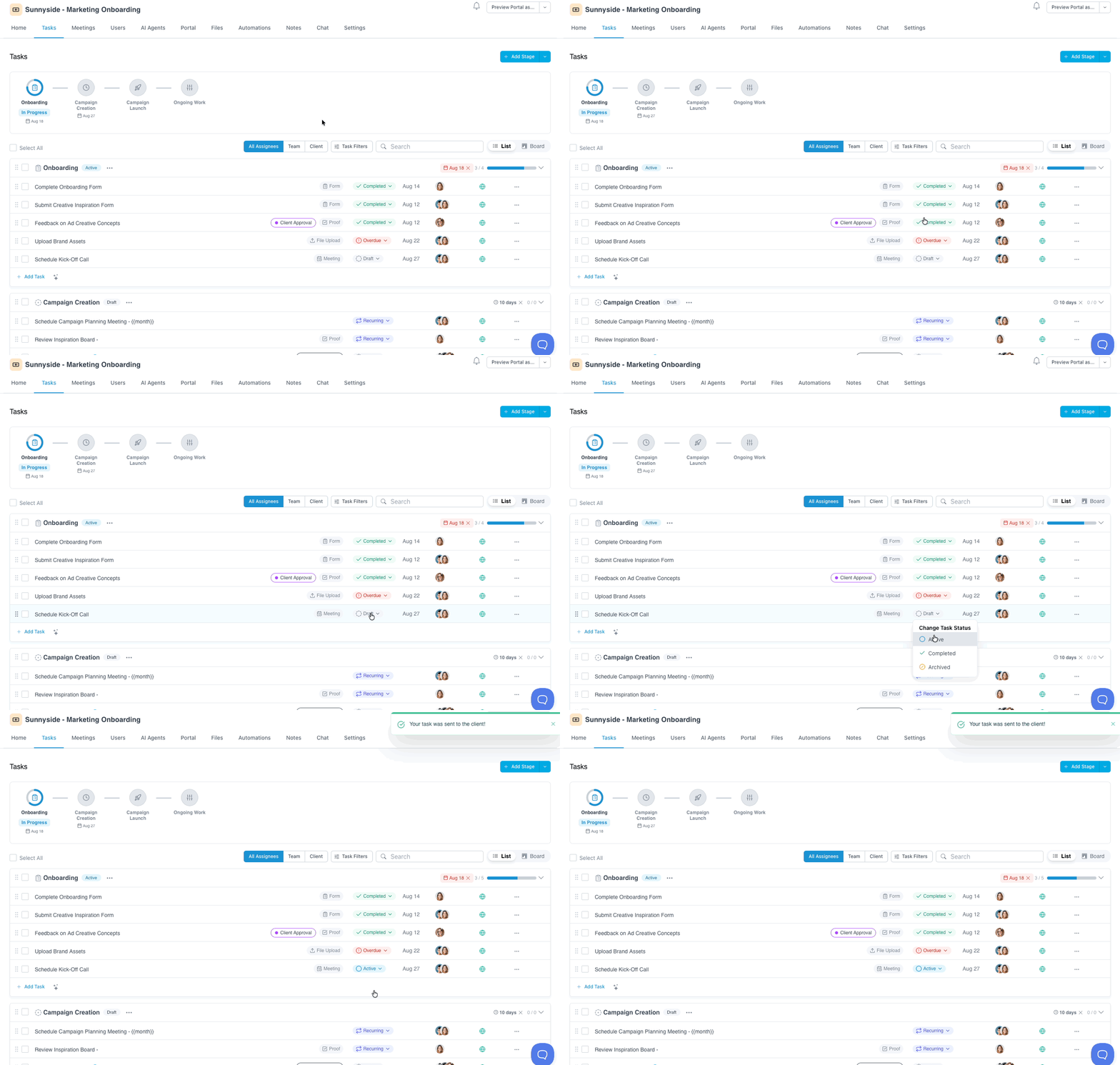
2. Send Tasks Using the Task Status Dropdown
From a project's "Tasks" page, click the status badge of the task you'd like to send. In the dropdown that opens, click "Active."
3. Send Tasks Using Bulk Actions
Using LaunchBay's Bulk Actions, you can send multiple tasks simultaneously. To do this, select the tasks you want to send from the Tasks page of a project and select "Send/Activate Tasks" from the Bulk Actions dropdown. Click here to learn more about using LaunchBay's bulk actions for tasks.
📢 Note: Any team member you’ve added to a project can complete Internal Tasks in LaunchBay. Only assignees receive notifications and reminder emails about a task.